WordPress SEO Consultant Who Actually Understands WordPress
Here's the truth: most "SEO experts" treat WordPress like any other website. They miss platform-specific optimizations that make the difference between page 1 and page 3 rankings.
WordPress powers 43% of all websites, but most sites waste that potential with bloated themes, misconfigured plugins, and technical issues that kill search visibility.
I'm a WordPress SEO consultant who knows the platform inside-out. Not just which plugins to install - but how to properly configure Core Web Vitals, optimize database queries, implement schema markup correctly, and fix the technical issues that drag down WordPress sites.
Whether you're running a blog, e-commerce store, business site, or portfolio - I help WordPress sites rank higher and load faster.
Why WordPress Sites Struggle With SEO
WordPress is powerful. But out-of-the-box, it has SEO problems:
Slow Page Speed
Heavy themes. Unoptimized images. Too many plugins. Bloated JavaScript. The average WordPress site loads in 10+ seconds. Google's Core Web Vitals update penalizes slow sites. Your rankings suffer.
Impact: Lost rankings, higher bounce rates, fewer conversions.
Technical SEO Issues
Duplicate content from category/tag pages. Missing XML sitemaps. Improper canonicalization. Orphan pages. Broken internal links. Crawl budget waste. Most WordPress sites have 10+ technical issues killing their rankings.
Impact: Google doesn't properly index your best content.
Plugin Conflicts & Code Bloat
You install Yoast or Rank Math. Good start. Then add schema plugins, caching plugins, image optimization plugins. Now you have 30+ plugins fighting each other, generating conflicting code, and slowing down your site.
Impact: Technical errors, slower load times, poor user experience.
Mobile Optimization Problems
Your theme claims to be "responsive." But mobile page speed is 2x slower than desktop. Navigation breaks on small screens. Forms don't work. Images don't scale. Google prioritizes mobile-first indexing - and your site fails.
Impact: Lower mobile rankings, lost mobile traffic (60%+ of searches).
Security & Maintenance Issues
Outdated WordPress core. Vulnerable plugins. No backups. Malware infections. When your site gets hacked and deindexed by Google, your rankings disappear overnight.
Impact: Complete loss of search visibility if compromised.
WordPress SEO Services Included
Comprehensive WordPress optimization covering everything that affects search rankings:
WordPress Technical SEO Audit
- Complete technical analysis using Screaming Frog and WordPress-specific tools
- Core Web Vitals assessment (LCP, FID, CLS)
- Database optimization and cleanup
- Permalink structure review and optimization
- Duplicate content identification and fixes
- XML sitemap configuration (including images, videos)
- Robots.txt optimization
- Internal linking structure analysis
- Orphan page detection
- Crawl budget optimization
Deliverable: 30-40 page detailed report with prioritized fixes
WordPress Speed Optimization
- Image optimization and compression (WebP conversion)
- Lazy loading implementation
- Plugin audit and removal of unnecessary plugins
- Caching configuration (WP Rocket, W3 Total Cache, or custom)
- Database query optimization
- JavaScript and CSS minification/combination
- CDN setup and configuration (Cloudflare, BunnyCDN)
- GZIP compression implementation
- Browser caching configuration
- Remove render-blocking resources
Target: Sub-3 second load times on mobile and desktop
WordPress Plugin Configuration & Optimization
- SEO plugin setup (Yoast SEO, Rank Math, or All in One SEO)
- Schema markup configuration for rich snippets
- Security plugin configuration (Wordfence, Sucuri)
- Backup plugin setup (UpdraftPlus, BackupBuddy)
- Performance plugin optimization
- Conflict resolution between plugins
- Plugin update management strategy
- Alternative solutions to reduce plugin count
Focus: Maximum functionality with minimum plugins (under 15 active)
WordPress Content Optimization
- Meta title and description optimization for existing posts
- Heading structure (H1, H2, H3) optimization
- Internal linking strategy implementation
- Image alt text optimization
- Category and tag structure optimization
- Author schema implementation
- Featured snippet optimization
- Content gap analysis and recommendations
- Old content refresh strategy
- FAQ schema implementation
Result: Better rankings for existing content without publishing new posts
WordPress Schema Markup Implementation
- Article schema for blog posts
- Product schema for WooCommerce stores
- Local Business schema for service businesses
- FAQ schema for Q&A content
- Review schema for testimonials
- Breadcrumb schema
- Organization schema
- Person schema for author pages
- Video schema (if applicable)
- Custom schema types as needed
Benefit: Rich snippets in search results = higher click-through rates
WordPress Security & Maintenance
- Security hardening (login protection, file permissions)
- SSL/HTTPS implementation and configuration
- Regular WordPress core updates
- Plugin and theme security updates
- Malware scanning and removal (if needed)
- Backup automation and testing
- Uptime monitoring
- Broken link monitoring and fixes
- 404 error page optimization
- Emergency recovery plan
Peace of Mind: Proactive protection against deindexing and ranking loss
How WordPress SEO Optimization Works
Complete WordPress Audit (Week 1)
I analyze your entire WordPress site: theme, plugins, speed, technical issues, content, security. You get a detailed report showing exactly what's holding back your rankings.
Priority Fixes (Week 2-3)
We implement critical fixes first: speed optimization, technical errors, security issues. These deliver immediate improvement in Core Web Vitals and crawl efficiency.
Content & Schema Optimization (Week 3-4)
Optimize existing content with better meta tags, internal links, and schema markup. No new content needed - we make what you have work harder.
Ongoing Monitoring (Monthly)
WordPress needs continuous maintenance. I monitor speed, security, broken links, plugin updates, and technical health. Catch problems before they hurt rankings.
WordPress Setups I Work With
WordPress.org (Self-Hosted)
Full control for maximum optimization. Best for businesses serious about SEO.
WordPress.com (Hosted Plans)
Limited customization but still optimizable within platform constraints.
WooCommerce Stores
E-commerce optimization including product schema, category pages, site speed for catalogs.
Multisite Networks
Multiple WordPress sites under one installation, each optimized separately.
Custom WordPress Builds
Sites with custom themes, page builders (Elementor, Divi, Beaver Builder), and unique architectures.
WordPress SEO Pricing
One-Time WordPress SEO Audit
$150
Complete technical audit with prioritized recommendations
WordPress Speed Optimization
$200
Full speed optimization targeting sub-3 second load times
Complete WordPress SEO Setup
$500
Audit + speed optimization + plugin configuration + schema implementation
Monthly WordPress SEO Management
Starting at $200/month
Ongoing optimization, maintenance, monitoring, and content recommendations
Is WordPress SEO Right for Your Site?
WordPress SEO services work best for:
- WordPress.org Sites (self-hosted with full customization control)
- Business Sites needing better local or national search visibility
- WooCommerce Stores with 50+ products needing technical optimization
- Blogs & Publishers monetizing through ads or affiliates (traffic = revenue)
- Service Businesses using WordPress for lead generation
Not a Good Fit For:
- ×Brand new sites with no content (build content first, then optimize)
- ×WordPress.com free plans (too limited for meaningful optimization)
- ×Sites planning platform migrations (optimize after migration)
WordPress SEO Case Studies
Real results from WordPress sites I've optimized:
.jpg&w=3840&q=75)
Gamerina - 709K Total Views
Comprehensive analytics showing traffic growth with consistent organic reach and search visibility improvements since June 2022.
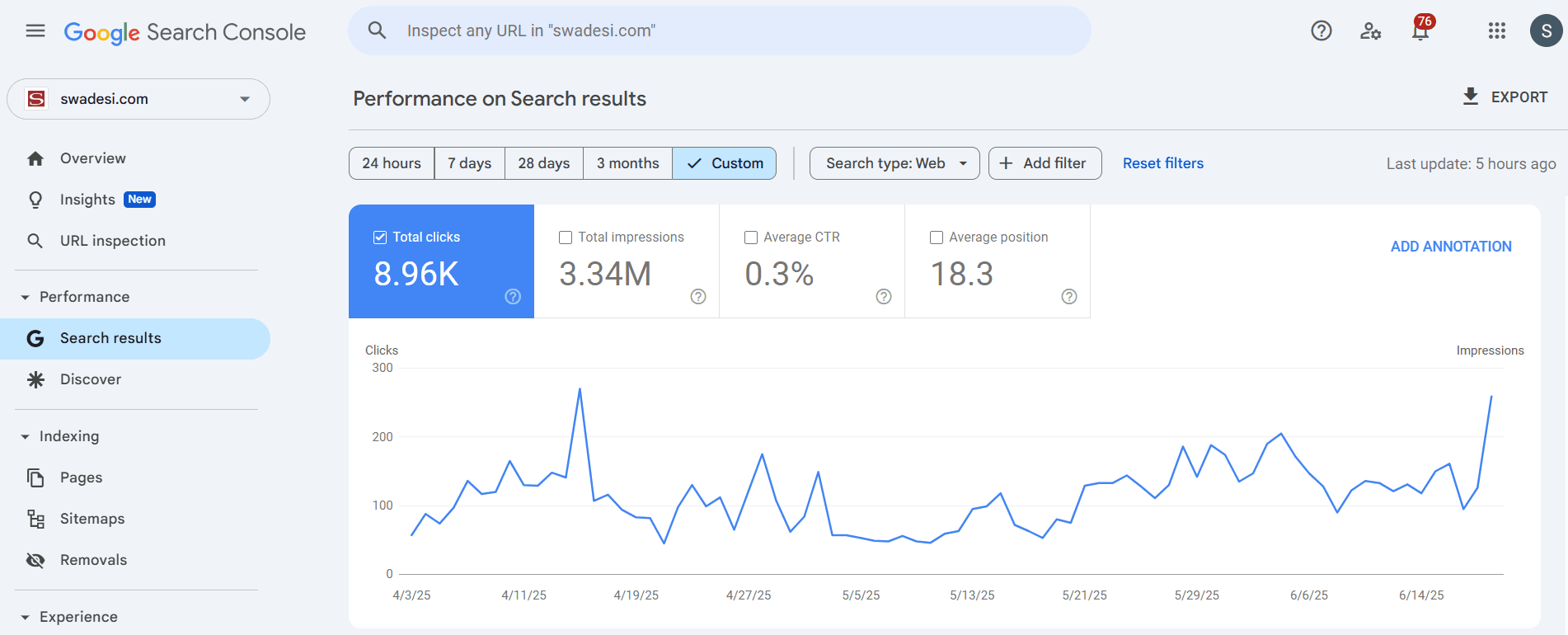
Swadesi News - 156% Traffic Increase
Comprehensive SEO recovery strategy that reversed catastrophic backlink loss and achieved significant traffic growth within 3 months.
WordPress SEO Questions
Which WordPress SEO plugin is best?+
For most sites, Rank Math or Yoast SEO. Choice depends on your needs, technical comfort level, and existing plugins. I'll recommend the right fit during audit.
How much faster will my WordPress site load after optimization?+
Target is sub-3 seconds on mobile and desktop. Most sites see 40-60% speed improvement. Exact results depend on current setup, hosting, and theme.
Will you break my site during optimization?+
Full backup before any changes. Staging environment testing where possible. Changes rolled out incrementally. Minimal risk with proper process.
Do I need to change themes for better SEO?+
Not always. Many bloated themes can be optimized. But sometimes switching to lightweight themes (GeneratePress, Astra, Kadence) delivers better long-term results. I'll recommend honestly.
Can you fix WordPress sites that were penalized or hacked?+
Yes. I handle malware removal, penalty recovery, and security hardening. Recovery typically takes 2-6 weeks depending on severity.
Will optimization affect my current rankings?+
Proper optimization improves rankings. I never implement risky techniques. All changes follow Google's guidelines and best practices.
Ready to Optimize Your WordPress Site?
Stop losing rankings to faster, better-optimized competitors.
Your WordPress site has potential - it just needs proper technical optimization, speed improvements, and schema implementation that most "SEO plugins" don't handle automatically.
I provide WordPress SEO services for international clients who need their sites to perform like revenue-generating machines, not slow-loading brochures.
Book a free consultation and I'll review your WordPress site, identify the biggest opportunities, and provide an honest assessment of what optimization would deliver.