
Your WordPress Site Deserves Better Than Page 3 Rankings
You've installed Yoast. Followed the tutorials. Checked all the boxes. But your WordPress site still isn't ranking, and you're losing money to competitors every single day.
I'm a WordPress SEO expert who doesn't just know how to handle WordPress websites but also how to rank them effectively. I've optimized dozens of WordPress sites across 6 continents, from gaming publishers to e-commerce stores seeing 233% traffic increases.
WordPress Sites Fail CWV
Web Uses WordPress
Continents Served
The WordPress SEO Problems Most Specialists Miss
Slow Page Speed Destroys Rankings (And Conversions)
The biggest WordPress SEO killer? Unused CSS and massive unoptimized images. I'v...
The biggest WordPress SEO killer? Unused CSS and massive unoptimized images. I've seen WordPress sites score as low as 60 on Google PageSpeed Insights. One Singapore business I worked with was losing customers because their service pages took 8+ seconds to load on mobile.
Impact: Google's Core Web Vitals update penalizes sites with these problems invariably. If your WordPress site loads in 5+ seconds, you're already losing rankings to faster competitors.
Theme & Plugin Conflicts Create Hidden Technical Disasters
Worst WordPress theme for SEO I've worked with? Divi. Not because it's inherentl...
Worst WordPress theme for SEO I've worked with? Divi. Not because it's inherently bad—but because it's complex, and one wrong setting tanks your technical SEO. Most WordPress site owners install plugins like they're collecting achievements.
Impact: That's why WordPress security directly affects SEO. If your site gets hacked, Google removes you from search results. Your rankings disappear overnight.
Core Web Vitals Failures (Most WordPress Sites Fail)
From my audits and industry research, most WordPress sites fail Core Web Vitals....
From my audits and industry research, most WordPress sites fail Core Web Vitals. Recent data shows only 46% of WordPress sites pass these critical metrics.
Impact: These aren't just technical metrics. They measure real user experience. Google uses them to determine rankings.
Mobile Optimization Failures You Don't See
Your mobile experience is broken, and you don't even know it. When I show client...
Your mobile experience is broken, and you don't even know it. When I show clients their mobile PageSpeed scores, it's always a shock. Desktop might be 70-80. Mobile is 30-40.
Impact: Google uses mobile-first indexing. If your WordPress site doesn't perform well on mobile, you won't rank well—period.
Security Vulnerabilities = SEO Death Sentence
I've worked on dozens of compromised WordPress sites. The pattern is always the ...
I've worked on dozens of compromised WordPress sites. The pattern is always the same: outdated core, vulnerable plugins, no backups.
Impact: WordPress security isn't optional for SEO. It's critical. One breach destroys years of SEO work. Preventing security issues is 100x easier than recovering from them.
Cookie-Cutter WordPress SEO Services Will Never Work
Here's What You Need Instead—WordPress SEO optimization tailored to your specific use case:
eCommerce / WooCommerce WordPress SEO Service
WooCommerce runs on WordPress, which means you inherit WordPress SEO problems PLUS e-commerce technical complexity.
WooCommerce-Specific Issues I Fix:
Duplicate content from product variations - Multiple URLs for same product (color/size variations)
Category page architecture - Flat vs hierarchical structure impacts crawling
Product page speed optimization - Large product images killing load times
My 4-Step WooCommerce SEO Process:
Product Page Speed
Automated image compression for every product photo
Category Architecture Review
Audit category hierarchy (avoid going deeper than 3 levels)
Product Schema Implementation
Install and configure WooCommerce schema markup
WooCommerce-Specific Sitemap
Configure XML sitemap for products and categories
Key Best Practices:
WordPress SEO Services Included
Comprehensive WordPress optimization covering everything that affects search rankings:
WordPress Technical SEO Audit
Deliverable: 20-30 page detailed report with prioritized fixes
WordPress Setups I Work With
I optimize WordPress sites across all configurations
WordPress.org (Self-Hosted)
Full control for maximum optimization. Best for businesses serious about SEO.
WordPress.com (Hosted Plans)
Limited customization but still optimizable within platform constraints.
WooCommerce Stores
E-commerce optimization including product schema, category pages, site speed for catalogs.
Multisite Networks
Multiple WordPress sites under one installation, each optimized separately.
Custom WordPress Builds
Sites with custom themes, page builders (Elementor, Divi, Beaver Builder), and unique architectures.
My 4-Week WordPress SEO Process
A systematic approach that delivers measurable results
Complete WordPress Audit
Step-by-Step Process:
- 1.Confirm WordPress - Verify site is WordPress (not custom build or other CMS)
- 2.Core Web Vitals check - Run Google PageSpeed Insights (primary tool)
- 3.On-page audit - Use Screaming Frog (paid version) to crawl entire site
- 4.Off-page/technical audit - Use Ahrefs Webmaster Tools (free)
Issue Priority System:
- Red tags = Critical issues (fix immediately - broken pages, security vulnerabilities)
- Yellow tags = Secondary issues (fix after critical - duplicate content, missing meta)
- Blue tags = Minor issues (fix when time allows - image alt text, URL structure)
Deliverable: Detailed audit report with prioritized action items
Technical Fixes & Speed Optimization
Step-by-Step Process:
- 1.Internal linking structure - Ensure proper site hierarchy
- 2.XML sitemap - Generate with SEO plugin, submit to Google Search Console
- 3.Robots.txt configuration - Allow/disallow correct pages for crawling
- 4.Fix broken pages - Find and fix ALL 404 errors (critical for SEO!)
Speed Optimization:
Target: Sub-3 second load times on mobile and desktop
Content & Schema Optimization
Step-by-Step Process:
- 1.Identify ranking content - Use Google Search Console to see what's ranking
- 2.Find keyword opportunities - Discover keywords each page ranks for
- 3.Verify backlinks - Check backlinks to key pages with Ahrefs
- 4.Fill gaps - Double down on missing keywords, acquire more backlinks
Schema Markup Types:
- Service businesses → Service schema
- E-commerce → Product schema
- Publishers → Article schema
- Local businesses → LocalBusiness schema
Monthly Monitoring & Maintenance
Step-by-Step Process:
- 1.Full site audit monthly - Review everything for new issues
- 2.Monitor new content optimization - Ensure new posts are SEO-ready
- 3.Check new images are compressed - Automated or manual review
- 4.Review plugin conflicts - New plugins may cause issues
Deliverable: Monthly performance report with actionable recommendations
WordPress SEO Case Studies & Results
Real campaigns with measurable, verified results
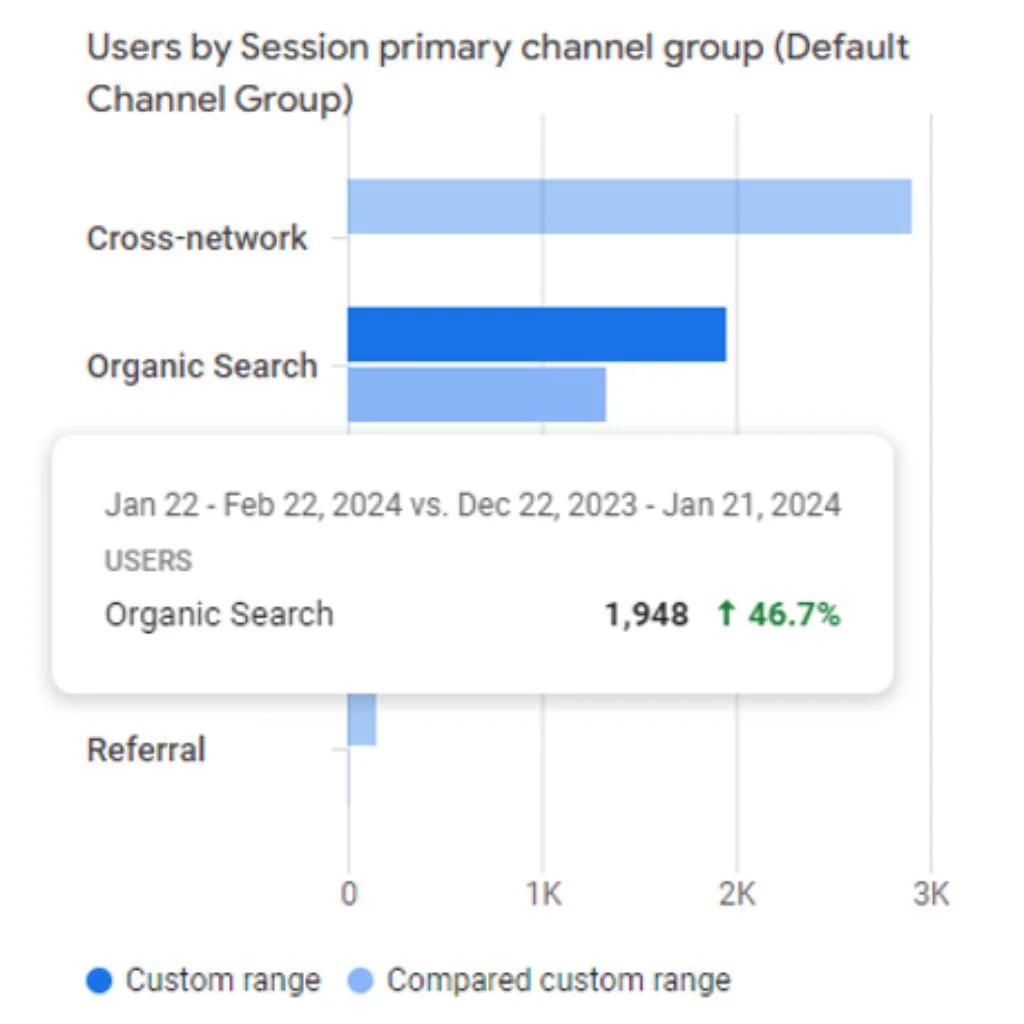
Focus360Energy
UK Sustainability & Energy
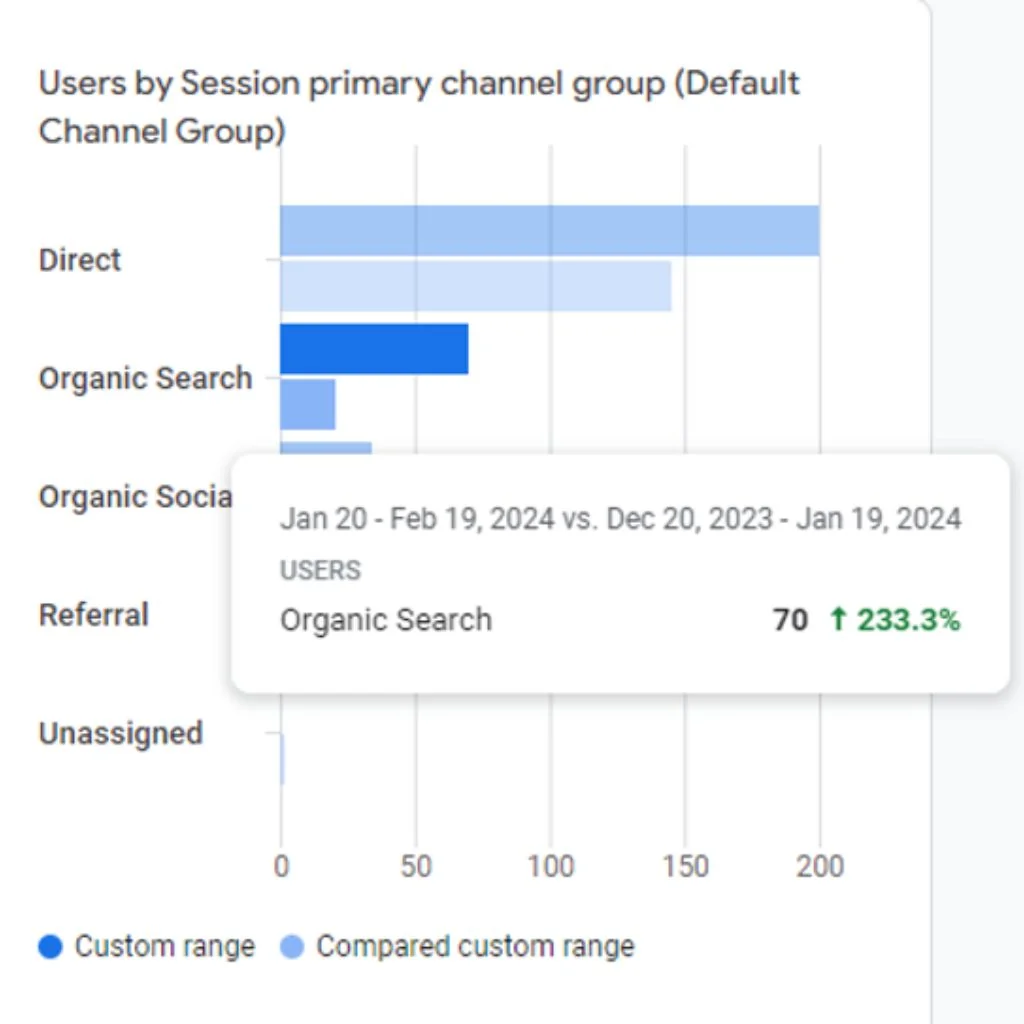
LON Ltd
UK E-commerce (Cable Organizing)
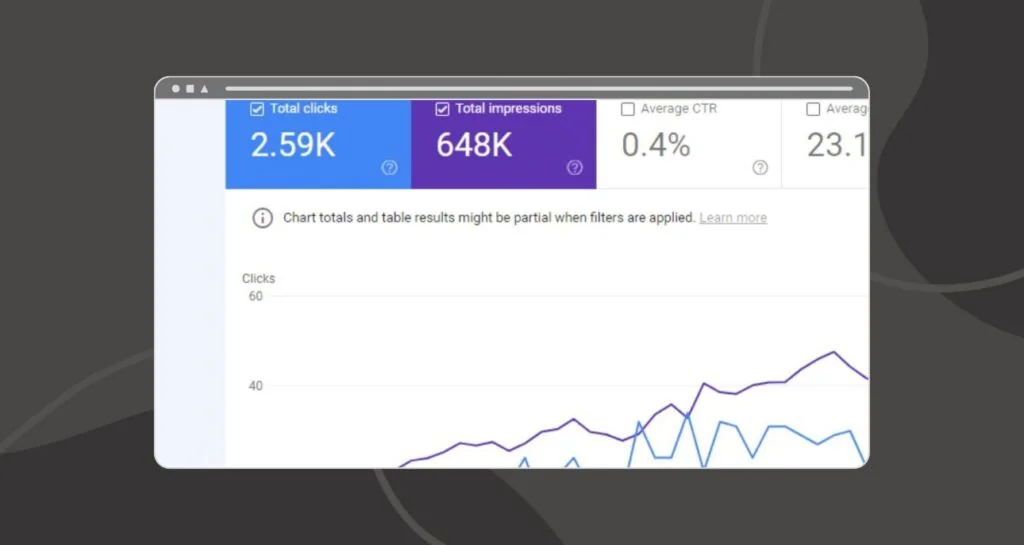
Pearl Lemon Tattoo
UK Tattoo Services
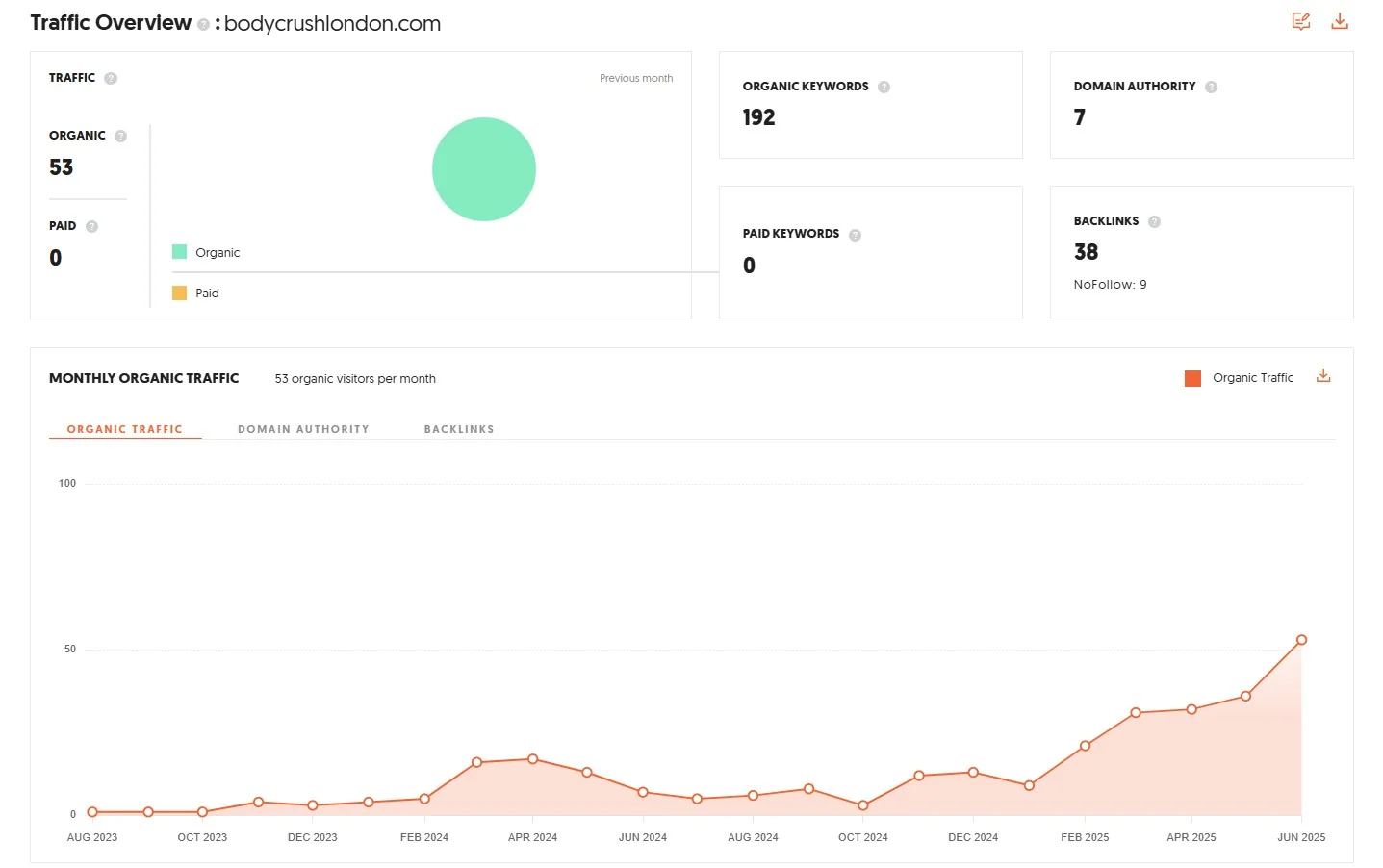
BodyCrush London
Cosmetics & Beauty
Your WordPress Site Deserves Better Rankings
If your WordPress site is underperforming, tell me what you're seeing. I'll look at the technical setup, content structure, and plugin or theme decisions that are likely holding it back.
Best WordPress Themes for SEO
Based on performance tests
| Theme | Load Time | Best For |
|---|---|---|
Hello Elementor | <0.5s | Pure Elementor builds |
Astra#1 PICK | 0.5s | All sites (my #1 choice) |
GeneratePress | 0.6s | Speed-focused sites |
OceanWP | 0.7s | E-commerce sites |
Kadence | 0.6s | Business sites |
Blocksy | 0.7s | Creative agencies |
Load Time Comparison
* Lower load times = Better performance. All times measured under optimal conditions.
My WordPress Tools & Recommendations
The exact tools I use for WordPress SEO optimization
Page Builders
My #1 Choice: Elementor
SEO Limitations: None that I've encountered in my experience. When configured properly, Elementor is perfectly fine for SEO.
Plugins That Commonly Slow WordPress Sites
Use Query Monitor (free plugin) to identify slow plugins on your site.
Recommended Hosting Plans for the Best WordPress SEO Results
Your hosting must deliver page load speeds between 500ms and 1,000ms for best SEO results
Namecheap
My top choice
- 4-5 premium WordPress plugins FREE for life:
- SiteSEO (advanced SEO plugin)
- Loginizer (security plugin)
- Softaculous (easy WordPress installation)
- These plugins alone are worth $100+/year
Hostinger
Budget-friendly alternative
- Good performance
- Affordable pricing
- Decent support
Hosting Requirement for Best WordPress SEO Results:
Before choosing WordPress hosting, ask the provider: "Do you guarantee WordPress sites on your platform will load in under 2 seconds?" If they can't answer confidently, find different hosting.
Good
Under 600ms TTFB
Acceptable
600ms - 1000ms TTFB
Poor
Over 1000ms TTFB
Is WordPress SEO Right for Your Site?
WordPress SEO services work best for:
- WordPress.org Sites self-hosted with full customization control
- Business Sites needing better local or national search visibility
- WooCommerce Stores with 50+ products needing technical optimization
- Blogs & Publishers monetizing through ads or affiliates (traffic = revenue)
- Service Businesses using WordPress for lead generation
Not a Good Fit For:
- ×Brand new sites with no content (build content first, then optimize)
- ×WordPress.com free plans (too limited for meaningful optimization)
- ×Sites planning platform migrations (optimize after migration)
Frequently Unanswered WordPress SEO Questions and Answers
If you're using Elementor Pro 3.19+, use Display Conditions to control visibility. Alternatively, use Rank Math or Yoast SEO plugin to noindex empty category pages. When you add content, manually remove the noindex tag.
My recommendation: Rank Math. It's easier to use and configure for WooCommerce sites with product schema automation, primary category selection, and a cleaner interface. However, never use multiple SEO plugins together—they conflict.
Structure content with 40-50 word paragraphs near the top that directly answer questions. Use proper heading hierarchy (H2 for questions, H3 for sub-questions). Keep paragraphs to 3 sentences maximum for featured snippet content.
No. Absolutely not. They conflict: duplicate meta tags, conflicting XML sitemaps, schema markup conflicts, database bloat. Choose one SEO plugin. Configure it properly. That's it.
Use Rank Math SEO Plugin: Go to Rank Math → 'Titles & Meta' → 'Posts' → Find 'Feed Settings' section → Enable 'Noindex Feed URLs' option. This keeps feed and archive URLs from creating duplicates while Google only sees the original.
WordPress.org (self-hosted) for business. Full plugin access, complete server control, no restrictions. WordPress.com is fine for personal blogs with no business goals.
2-4 months minimum. You'll start seeing good results at 3 months. Sometimes sooner for low-competition keywords, sometimes longer for competitive niches. Month 1-2: Small changes. Month 3-4: Visible improvements. Month 5-6: Compounding results.
Yes. I started doing SEO without any coding knowledge. Use WordPress SEO plugins like Rank Math (best free option), Yoast SEO, or SiteSEO that automatically configure settings for meta tags, XML sitemaps, schema markup, and more.
Good SEO is good GEO (Generative Engine Optimization). If your WordPress site has proper SEO fundamentals, it will automatically show up in AI search results. Proper site settings, clean URL structure, XML sitemap, quality content—do regular SEO properly.
Your WordPress hosting must deliver pages in 0.5 to 1 second (500-1000ms server response). Before choosing hosting, ask: 'Do you guarantee WordPress sites on your platform will respond in under 1 second?' Good TTFB is under 600ms. Over 1000ms is poor—consider upgrading.
They do different things. Hire a developer when building from scratch, custom functionality, or complex coding. Hire a WordPress SEO specialist when the site is already built and you need better organic visibility, more traffic, technical SEO optimization, or ongoing rankings monitoring.
It depends on the scope of work and the state of your site. Rather than quoting generic numbers, I prefer to understand your specific situation first — what's working, what's not, and what you're trying to achieve. Reach out and I'll give you an honest assessment.
You CAN DIY if running a hobby project, have time to learn (3-6 months minimum), and can afford mistakes. You SHOULD hire if website is your business, don't have months to learn, want results without trial-and-error, or can't afford to lose rankings from mistakes.
Measure via Google Search Console: 10% increase in organic visibility = doing well, 10-50% = doing very well, 50%+ = exceptional results. Track impressions, clicks, average position, and click-through rate monthly.
WooCommerce needs transactional optimization: product schema (price, availability, reviews), multiple product images optimized for speed AND quality, category pages as landing pages with unique descriptions, and handling duplicate content from product variations and filtered URLs.
Generally yes. Blogs target informational intent with broad audiences (100,000 potential searchers for 'how to watch football' vs 1,000 for 'football coaching'). But service sites CAN rank well with highly specific targeting, local SEO focus, quality backlinks, and strong on-page optimization.
You CANNOT effectively optimize one page for both. Create separate pages: Local services page (with LocalBusiness schema, NAP, local testimonials) and International services page (with country mentions, global service delivery, timezone flexibility). Each page targets its geographic intent.
Free translation plugins DON'T include SEO provisions—no translated URLs, no hreflang tags, no proper indexing. For serious multilingual SEO, you need paid versions like WPML ($99/year) or Weglot Professional ($99/month) that provide translated URLs, automatic hreflang, and language-specific sitemaps.
How Long Do You Want to Wait Before Your WordPress Site Ranks on Google's Page 1?
WordPress holds over 43% of the CMS market share. Your website has massive potential—it just needs someone who understands WordPress-specific SEO.