
Link building includes guest posts, link insertions, web 2.0, comment linking, local citations, image submissions, social bookmarking, branded networks, and PR releases.
This document, however, covers only one of them: Web 2.0.
The document outlines the guiding principles for creating quality web 2.0 links, the checklist for easy creation, and the do's and don'ts. In addition, it presents a list of the top web 2.0 websites that accept web 2.0 publications.
Web 2.0 Guidelines: What NOT to Do When Publishing Content
1. Don't Publish the Same Content on Different Web 2.0 Platforms
Rather, rephrase the first content, leaving the keyword intact.
You can use a one-line prompt in ChatGPT to rewrite or rephrase the first piece of content you created for your web 2.0.
2. Distribute Web 2.0s Across Multiple Platforms, Not a Single Platform
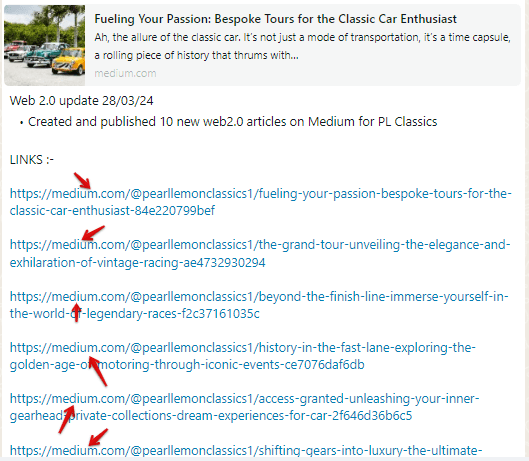
The primary emphasis is on diversifying content across multiple platforms rather than creating multiple content on the same platform. More often than not, when publishers are requested to publish on platforms, they go on a spree to publish ten different content on one single platform, e.g., Medium, at a go. But that is not what I request them to do. What I request rather is that they post each among the ten content on ten different platforms. So that's one content per platform. Each platform has its unique audience and purpose, so spreading content across various platforms ensures broader reach and engagement.
Here's an analogy that helps explain better: You have ten delicious dishes you want to share. You wouldn't put all ten on a single plate, would you? You'd serve each dish on appropriate plates – a pizza on a platter, soup in a bowl, and so on.
Below, this publisher published different content on only Medium.
3. Don't Publish Twice on a Web 2.0 Accepting Platform
This can easily lead to the account getting banned. So please desist from publishing Web 2.0s on only one platform.
When a publisher posts a Web 2.0 twice or more on a platform, he/she is no longer doing Web 2.0. It is then called Spamming. Often, this infuriates the admin of Web 2.0-accepting platforms such as Substack, leading them to delete the account and label it as spamming.
In the end, Google will also get the "hint" that such content and links in the content deleted are not relevant.
4. Don't Use One Image for Every Web 2.0 Content You Publish
For example, an intern used the same image for every web 2.0 piece he published throughout the week. He continued the same thing the next week. I advised him to stop such practice because the web 2.0 content published must appear unique and be genuine, not like duplicates.
5. Don't Link Only on Secondary Keywords
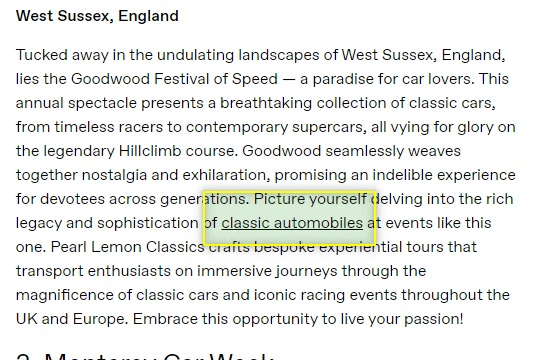
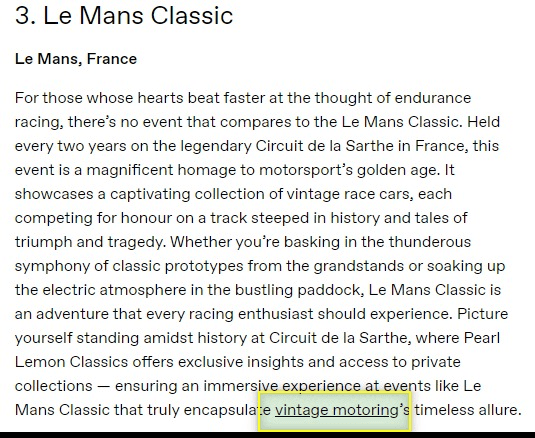
As you can see, Images 3.1 and 3.2 are taken from the same content. Two different terms or phrases are hyperlinked, but neither is the primary keyword given to this web 2.0 content writer. The primary keyword given was "classic car." Now, that term wasn't hyperlinked in the content.
Please try not to make a similar mistake. Hyperlink on the primary keyword once, then diversify the hyperlinking to other terms you are working with or targeting.
6. Don't Do a Train of Links
Don't use complete sentence(s) as anchor text.
Sometimes, glitches might occur on a publishing website, so things might not go according to their meaning. In the image of the case study shown above, interlinking didn't go well. Rather than proper interlinking, there's a train of links that circles almost the entire body paragraph. The publisher is expected to correct this by all means necessary. This is because the essence of interlinking a word term is to:
- For users to discover related topics which will improve user experience
- To signal relevance to search engines
- Improves ranking potential
- For search engines to understand website structure
Web 2.0 Best Practices: What TO DO for Quality Link Building
1. Use Google Images for Your Web 2.0 Content
Just paste your keyword into Google and download or copy an image relevant to the keyword.
2. One Keyword Per Content
For instance, if you are given a series of keywords to create web 2.0 targeting a particular page, use one per day. Don't stuff all keywords into one content at the same time.
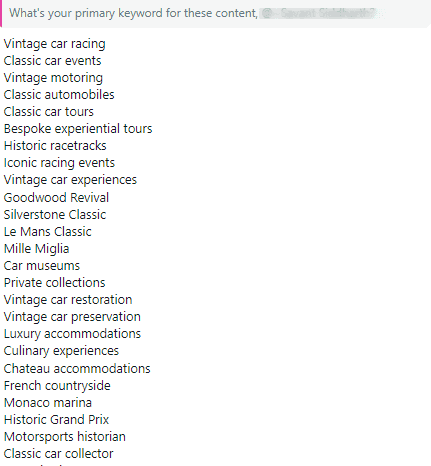
For instance, you can use "vintage car racing" for today and "classic car events" for tomorrow. Follow that pattern. Don't cram five different keywords into one piece of content, like a food vendor forcing vegetables, sliced cheese, and meat into a sandwich.
3. Interlink Only on Your Primary Keyword
At all times, you must also ensure you interlink only your primary keyword (except when you have a primary and secondary keyword, in which case you interlink both) in the content body paragraph, not in the subheadings or title.
Diversify Your Backlinks
Forget the old rule of focusing on a single primary keyword for interlinking your web 2.0s. That approach can hurt your SEO as Google frowns upon manipulative backlink strategies. When you have a variety of anchor texts that make your backlink profile look natural, you avoid raising red flags.
Mix It Up:
Don't just interlink with one exact keyword. You should interlink with a variety of keywords. So ideally, you should be given a primary keyword and other synonyms. You should interlink once or at most twice on the primary keyword. Other types of interlinking should occur on synonyms or branded anchors (e.g., company name), or generic terms similar to the primary keyword (e.g., "cleaning solutions"), and or long-tail phrases similar to the primary key term ("best eco-friendly cleaning services"). You can also make good use of Navigational with Keywords (e.g., Get your home cleaned by CleanFreaks). In times when you've exhausted all the latter, feel free to interlink to the naked URL.
4. Your Primary Keyword Must Be in Your Title
Your keyword should always be or make up your content title, not something else. Preferably, the keyword should be at the beginning of your title.
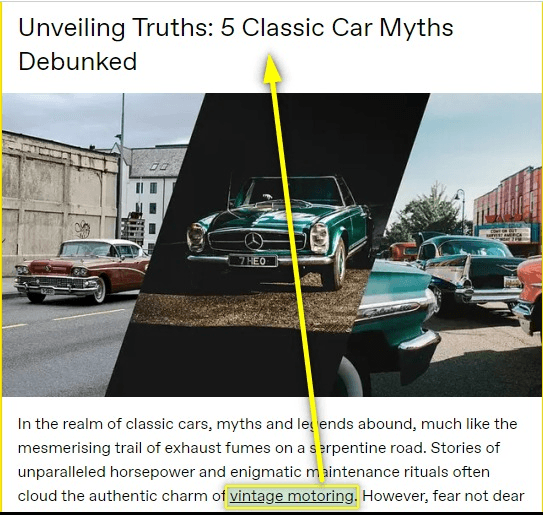
In the case above, the keyword assigned for the content is "vintage motoring". That should be in your title, not "classic car myths" or "classic cars".
5. Only Interlink Your Keyword in the Body Paragraph
Usually, you should work with only one primary keyword to avoid dilution or confusion when search engines like Google or Bing parse the web 2.0 content. This interlinking should only occur in the body of the content.
Case Study
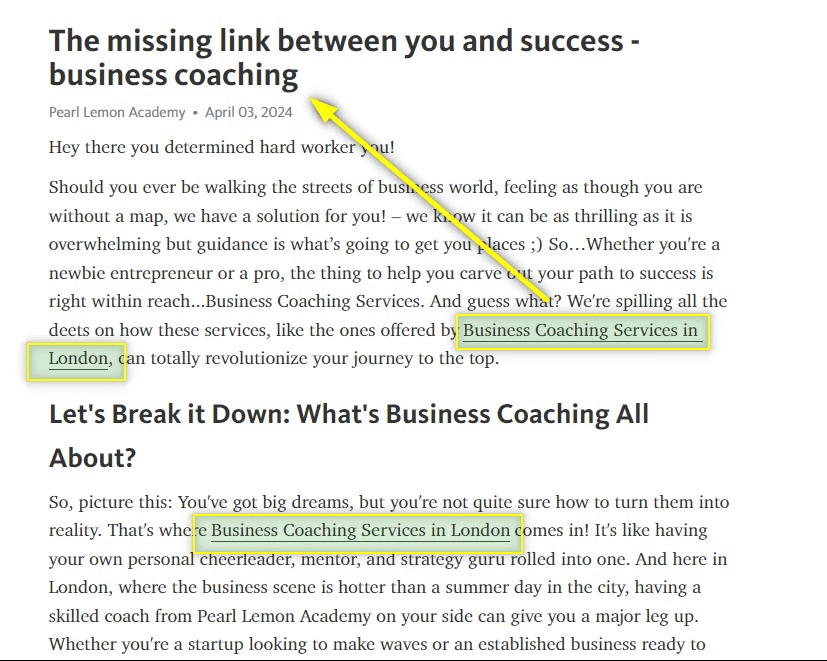
As you can see, this is published web 2.0 content with the primary keyword "business coaching services in London". You'll note that only "Business coaching" is used in their title. This can lead to the content being shown by Google to readers who aren't the target audience. As you can see, the primary keyword targets the audience in London, UK. However, only "Business coaching" will mean search engines won't know that the content is targeted at people in the UK and, therefore, won't show the keyword to people in the UK.
Therefore, you should have "business coaching services in London" in your title, not just "Business coaching."
Again, only interlink your keyword in the article.
7. Don't Forget to Publish the Newly Created WordPress Site
In case you use WordPress's free website service to create web 2.0, take note that WordPress, even after fully creating all aspects of the site that are needed, requires you to publish the site. If you don't, the site will remain in Draft mode and not live.
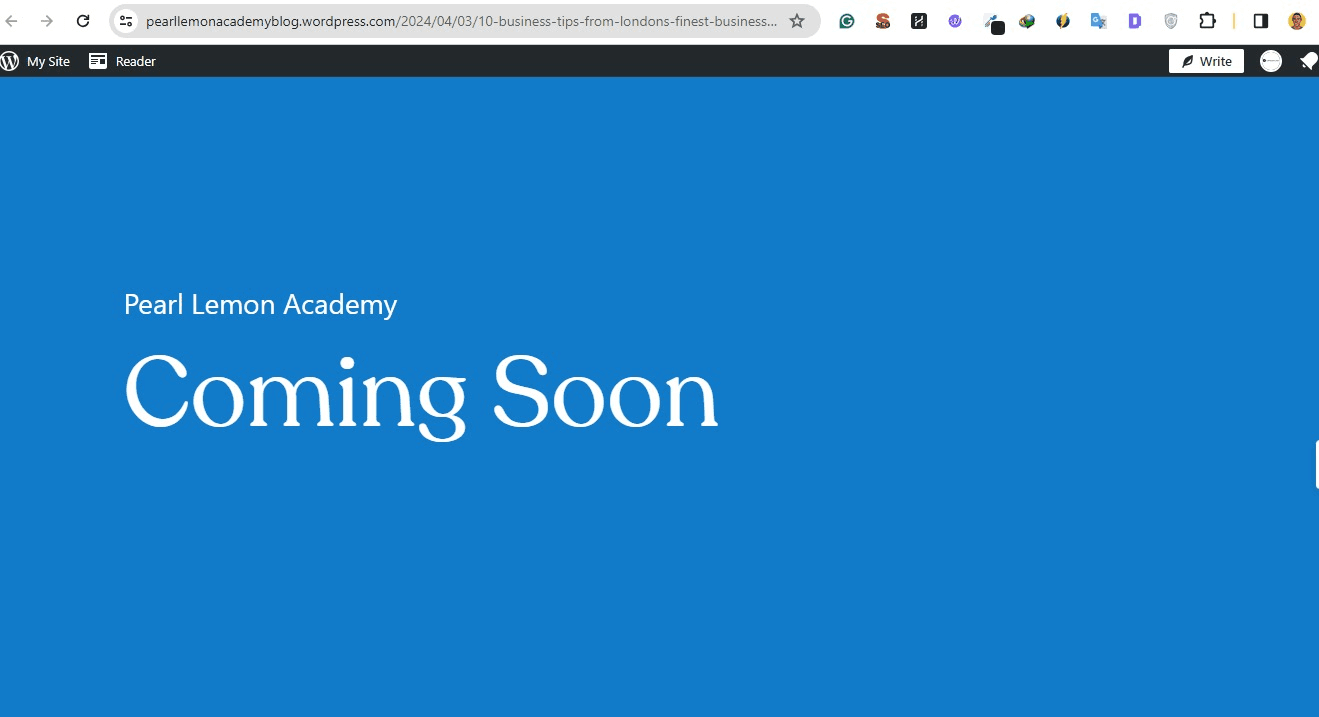
To solve this, just go to the wp-admin panel of the site (WordPress) and publish the draft version of the site itself.
8. Create Brand Name Accounts on Web 2.0 Websites
It is imperative that you create a brand name account for the brand you are targeting and publish on it. It's not a good idea to create a personal account and publish on that. When web 2.0 content gets indexed and displayed on SERP, (if the account used to publish is the brand name) the brand name will appear along with the web 2.0 content, which looks more credible than when random named accounts are used. In the example below, the publisher published on a personal account.
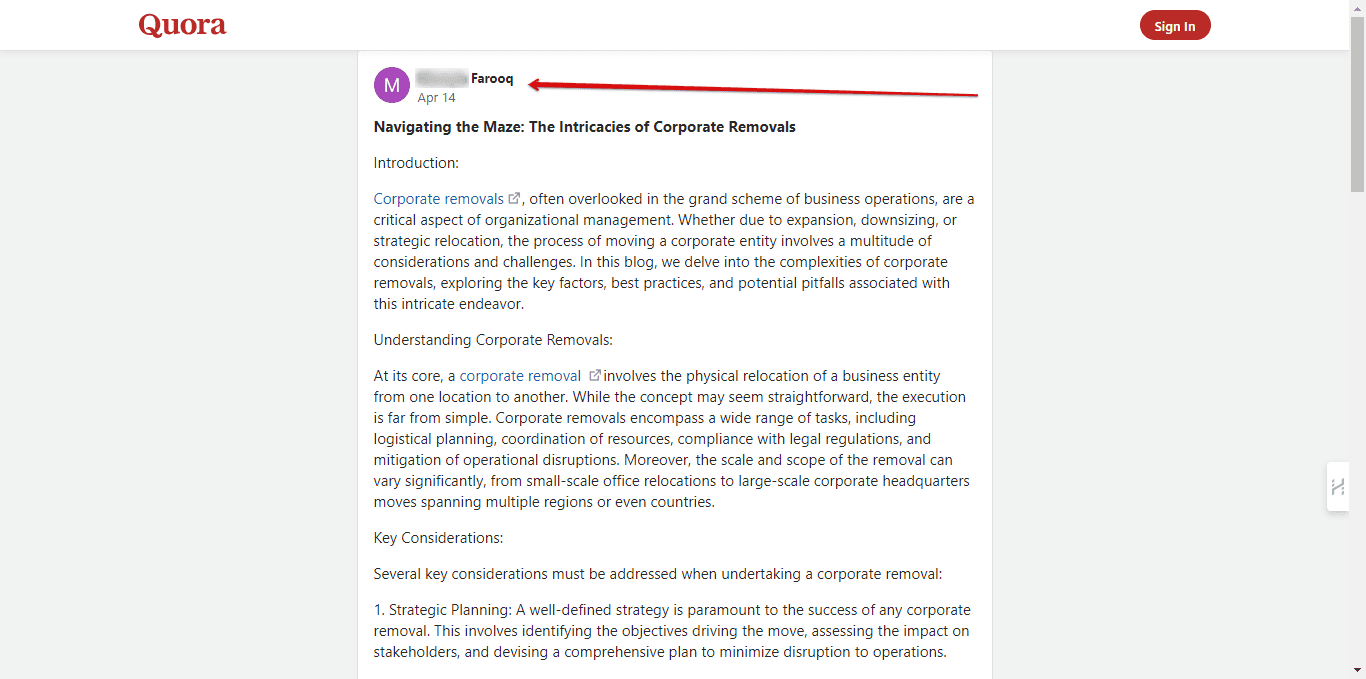
In this case, the platform used is Quora. The publisher used their name to create a personal profile which the web 2.0s are published on. What is advised here is that the publisher creates a "Space" on Quora with the brand name, e.g., "Corporate Removal Group's Space" and publishes the web 2.0s on that.
Step-by-Step Checklist for Web 2.0 Creation
One or two, or more of the steps below must not be skipped.
- Have a keyword
- Have a target URL
- Use keywords to create content (e.g., with ChatGpt, Bard, Claude, etc.)
- Rephrase content into the number of links you are to produce for the day
- Do interlink in the content created
- Interlink only on the keyword
- Ensure your H1, H2, H3, H4, etc. are well structured
- Include an image in your content
- Go over and edit the content through (X2)
- Create an account on a web 2.0-accepting platform, e.g., Blogger or Medium
- Publish your content
- Copy the link to the newly published content
- Open a new tab and paste it if it successfully loads
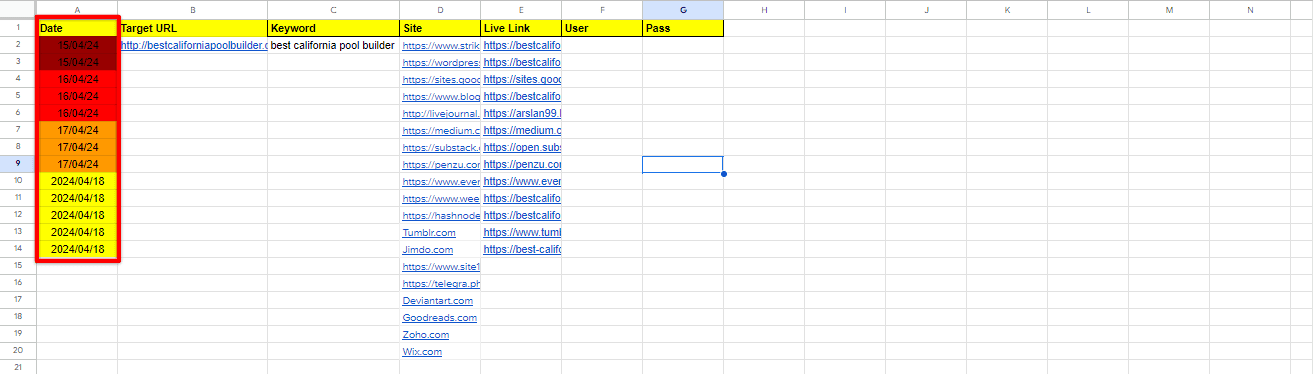
- Paste the live links produced for the day in the sheet
- Share sheet link for a review on WhatsApp
Verified List of Free Web 2.0 Websites That Actually Works (And I Keep Updating)
Below is a comprehensive list of verified web 2.0 websites where you can publish content and build quality backlinks:
- sites.google.com
- hive.com
- blogger.com
- substack.com
- medium.com
- fandom.com
- zupyak.com
- hashnode.dev
- telegra.ph
- evernote.com
- wordpress.com
- clickup.com
- edublogs.org
- notion.so
- tumblr.com
- quora.com
- justpaste.it
- diigo.com
- anotepad.com
- penzu.com
- google.com/business
- bingplaces.com
- tripadvisor.com/business
- trustpilot.com
- crunchbase.com
- producthunt.com
- slideshare.net
- openstreetmap.org
- bizcommunity.com
- crowdreviews.com
- c2creview.co
- feedbax.io
- vendor.clutch.co
- digitalagencynetwork.com
- theknowledgeonline.com
- about.me
- sitelike.org
- business.yelp.com(Mentions only)
- trustradius.com(Mentions only)
- capterra.com(Mentions only)
- scribd.com(Mentions only)
Need Professional Link Building Help?
Web 2.0 link building is just one aspect of a comprehensive SEO strategy. View my link building case studies or explore my PPC services for faster results.
Get Link Building Help